
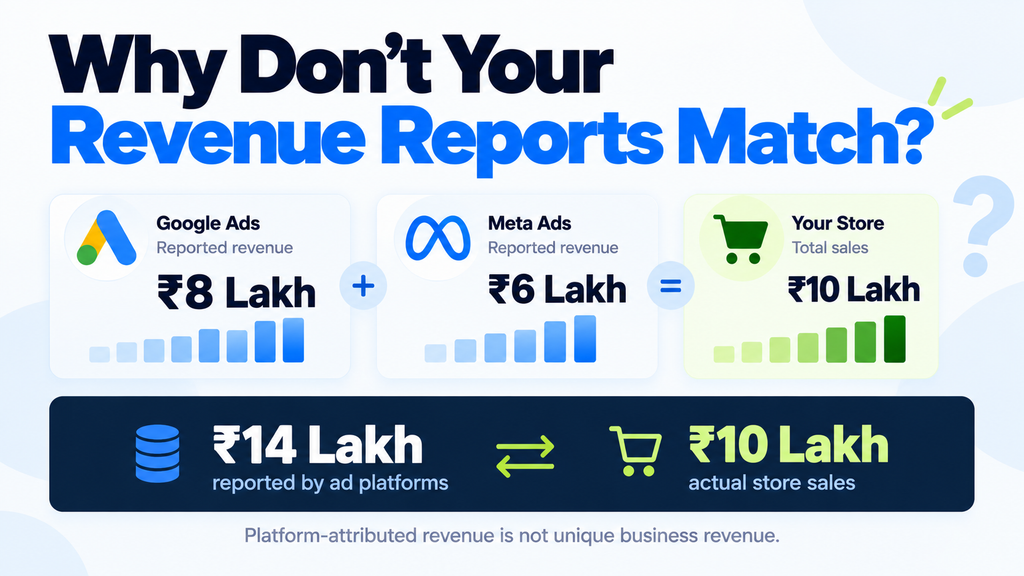
Google Ads reports ₹8 lakh in revenue.
Meta Ads reports ₹6 lakh.
Your ecommerce store reports ₹10 lakh in total sales.
Now, when you add the revenue reported by Google Ads and Meta Ads, you get ₹14 lakh.
But your business has generated only ₹10 lakh in sales.
So, where did the additional ₹4 lakh come from? Is Google Ads reporting incorrect numbers? Is Meta Ads taking extra credit? Or is something wrong with your Google Analytics 4 (GA4) tracking?
If you are managing performance marketing campaigns for an ecommerce business, you might have faced a similar situation.
Note: These revenue figures are illustrative examples created to explain the reporting differences.
The problem becomes even more confusing when a business owner or client asks a simple question: “Which revenue number should we trust?”
Before blaming the tracking setup, it is important to understand how each platform measures and attributes conversions.
In this article, I will explain why these revenue discrepancies happen, how performance marketing attribution works and how to reconcile your Google Ads, Meta Ads and GA4 reports.
Let’s get started!
Why Do Google Ads, Meta Ads and GA4 Report Different Revenue?
Google Ads, Meta Ads and GA4 can report different revenue because they use different attribution rules, conversion dates, reporting settings and measurement methods.
The same customer purchase can receive credit from more than one advertising platform, even though the business has received only one order.
There can also be differences caused by purchase tracking, conversion values, refunds, currencies and technical implementation.
Revenue reconciliation is the process of understanding these differences, identifying genuine tracking problems and creating a consistent reporting process.
The goal is not to make every dashboard show the same number. It is to understand what the numbers represent and use them for the right decisions.
What Is Performance Marketing Attribution?
Before getting into the reasons for revenue discrepancies, let’s understand what performance marketing attribution means.
Performance marketing attribution is the process of assigning credit for a conversion to the marketing interactions that contributed to it, based on specific reporting rules.
For example, imagine a customer who first discovers your product through Instagram.
After a few days, the same customer searches for your brand on Google, clicks your advertisement and completes a purchase.
Now, which platform should get credit for that purchase?
Is it Meta Ads because the customer first discovered your product there?
Or is it Google Ads because the customer clicked the advertisement before purchasing?
The answer depends on the attribution rules used by the reporting system.
This is where marketers should understand three important terms.
1. Recorded revenue
Recorded revenue refers to purchase values captured by a system, based on the events and data it receives.
For example, GA4 might record a purchase event with a value of ₹5,000.
However, whether GA4 captures every actual order correctly depends on how the tracking has been implemented.
2. Attributed revenue
Attributed revenue is the revenue assigned to a marketing channel, campaign or interaction based on the reporting system’s attribution rules.
This is what you commonly analyse when measuring campaign performance in Google Ads and Meta Ads.
3. Business revenue
Business revenue is the revenue recorded by your ecommerce store, order management system or finance software, according to the definition your business follows.
For example, your finance team might consider completed orders after refunds and cancellations, while a marketing report might show purchase values before those adjustments.
These numbers are related, but they are not always directly comparable.
What does each platform report?
| Platform | What the revenue report helps you understand |
|---|---|
| Google Ads | Which conversion actions and values received credit from eligible Google advertising interactions |
| Meta Ads | Which purchases received credit under the selected Meta attribution settings |
| GA4 | Which purchase values were recorded and how revenue is assigned across channels in the selected reports |
| Ecommerce store or finance system | Which orders and revenue values are included in the business’s agreed reporting definition |
Remember: Selecting the same date range in all four systems does not mean they are measuring the same thing.
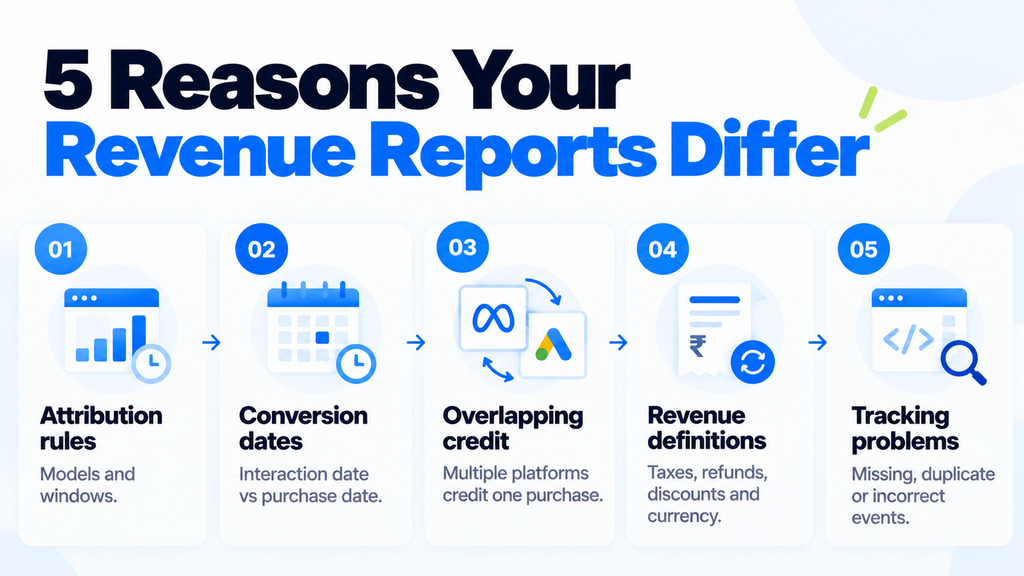
5 Reasons Google Ads, Meta Ads and GA4 Revenue Doesn’t Match
Now that you know what attribution means, let’s understand the five major reasons behind performance marketing attribution discrepancies.
1. Different attribution models and windows
Every advertising platform has its own rules for assigning credit to a conversion.
These rules can include which advertising interactions qualify, how long after an interaction a purchase can receive credit and how conversion value is distributed.
This is commonly known as an attribution model and attribution window.
Let’s take a simple example.
A customer notices your product through a Meta advertisement on Monday.
On Thursday, the customer searches for your brand on Google and clicks a Search advertisement.
On Friday, the customer purchases the product.
Depending on the eligible interactions and the selected settings, Google Ads and Meta Ads may report the purchase differently.
Meta Ads can include click-through, view-through and other supported engagement-based attribution options, depending on the campaign and settings available in the account.
Google Ads also uses its configured attribution and conversion settings to assign credit.
This doesn’t automatically mean that either platform is wrong.
What should you check?
Review the attribution model, attribution window, conversion action and eligible interactions in each platform.
Do not assume that all advertising accounts use identical settings.
Type of discrepancy: Usually explained by reporting rules.
2. Conversions can appear on different dates
This is one of the easiest reporting differences to overlook.
Imagine that a customer clicks your Google advertisement on Monday but purchases on Wednesday.
In standard Google Ads conversion reporting, the purchase can be credited to Monday, the date of the advertising interaction.
In GA4’s purchase reporting, the purchase is recorded on Wednesday, when the purchase event occurred.
Now, imagine you are comparing daily revenue reports.
Google Ads may show the conversion on Monday, while GA4 shows it on Wednesday.
If this happens towards the end of a month, the difference can affect your monthly reports as well.
Does this mean tracking is broken?
Not necessarily.
You may simply be comparing revenue recorded using different dates.
How to investigate it
Google Ads provides conversion-time reporting columns, including:
- Conversions (by conv. time)
- Conv. value (by conv. time)
These can help you compare conversion values based on when conversions occurred rather than when the original advertising interactions happened.
You should also allow time for reporting delays before finalising very recent data.
Type of discrepancy: Usually explained by reporting-date differences.
3. Google Ads and Meta Ads can both claim the same purchase
Let’s return to the ₹10 lakh ecommerce example.
Suppose one customer interacts with a Meta advertisement, later clicks a Google advertisement and purchases a product worth ₹5,000.
Depending on the platforms’ attribution settings and the qualifying interactions, both Google Ads and Meta Ads may assign credit to the same ₹5,000 purchase.
But the ecommerce store received only one order worth ₹5,000.
The customer didn’t purchase two products simply because two advertising platforms were involved.
This is why adding revenue reported by advertising platforms can create misleading business totals.
For example:
| Source | Illustrative reported revenue |
|---|---|
| Google Ads | ₹8,00,000 |
| Meta Ads | ₹6,00,000 |
| Combined platform-attributed revenue | ₹14,00,000 |
| Ecommerce store revenue | ₹10,00,000 |
The ₹14 lakh figure represents a combination of independently attributed platform values. It should not be treated as ₹14 lakh in unique business sales.
Also, the ₹4 lakh difference cannot automatically be labelled as duplicated revenue. You need to understand the attribution and measurement rules before explaining the gap.
My suggestion: Always keep total business revenue separate from platform-attributed revenue when preparing management reports.
Type of discrepancy: Often explained by overlapping attribution credit.
4. Revenue is defined differently across platforms
Have you checked whether all your dashboards are reporting the same type of revenue?
This might sound like a small detail, but it can create significant differences.
For example, an ecommerce order may include:
- Product value
- Shipping charges
- Taxes
- Discounts
- Refunds
- Currency conversion
- Payment or order status
Your store might report an order total including taxes and shipping, while your purchase tracking may send only the item value.
Similarly, refunds and cancellations may be processed differently across systems.
Suppose your store records an order worth ₹5,000, but your tracking implementation sends a purchase value of ₹4,500.
Even if the purchase is recorded successfully, you now have a ₹500 measurement difference.
Imagine similar differences occurring across hundreds of orders.
Before changing attribution settings, verify how purchase values are calculated and transmitted.
What should you check?
Compare the revenue definition used in your ecommerce store, GA4, Google Ads and Meta Ads.
Verify whether taxes, shipping, discounts, refunds and cancellations are included or excluded.
Also, check that all reports use the same currency or an agreed conversion method.
Type of discrepancy: Revenue-definition mismatch requiring investigation.
5. There may be a genuine tracking problem
Not all revenue discrepancies happen because of attribution.
Sometimes, the purchase tracking setup is incorrect.
For example, your website may fire a purchase event twice after someone completes an order.
Or your purchase event may not fire when a customer uses a particular payment method.
In some implementations, browser tracking and server-side tracking may also send duplicate events if deduplication has not been configured correctly.
These situations can affect reported purchase counts and values.
Some common technical issues to investigate include:
- Purchase events firing more than once
- Incorrect purchase values or currency
- Missing or inconsistent transaction IDs
- Conversion actions configured incorrectly
- Purchase events firing before a successful transaction
- Browser and server events not being deduplicated correctly
- Consent settings or browser restrictions affecting measurement
- Reporting delays or incomplete recent data
For Google Ads, also check whether you are comparing the Conversions column with All conversions.
Depending on the configuration, these columns can include different conversion actions.
If your store records 100 completed orders but your GA4 property records 130 purchase events, that is a reason to investigate the purchase implementation.
However, don’t conclude that tracking is broken until you have checked the actual events and reporting definitions.
Type of discrepancy: Potential implementation problem.
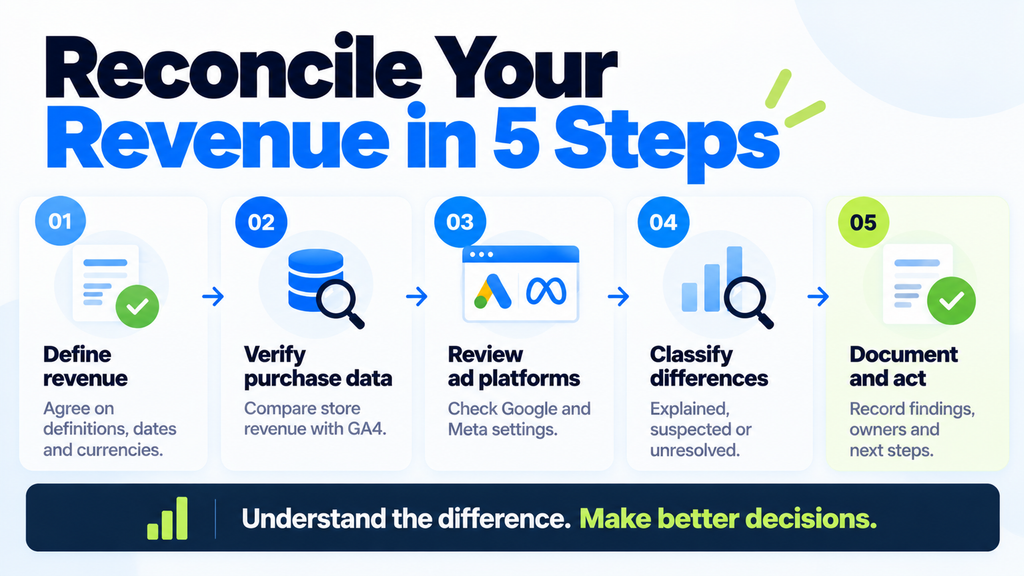
How to Reconcile Google Ads, Meta Ads and GA4 Revenue in 5 Steps
Now comes the most important part.
Instead of randomly changing attribution settings, use a structured approach to understand the differences.
The following five-step revenue reconciliation workflow can help your marketing and finance teams create a reporting process that is easier to maintain.
Step 1. Define revenue before comparing dashboards
First, decide what revenue actually means for your business report.
You need to document the following details:
| Reporting setting | What to define |
|---|---|
| Date range | Start and end dates |
| Timezone | Agreed reporting timezone |
| Currency | Reporting currency and conversion method |
| Conversion | What qualifies as a completed purchase |
| Revenue | Whether taxes, shipping and discounts are included |
| Refunds | How returns and cancellations are handled |
| Attribution | Model and window used in each system |
| Date basis | Advertising interaction date or conversion date |
This creates a common reporting agreement between the business owner, marketing team and finance team.
For example, if your finance team reports revenue excluding cancelled orders, document that definition clearly.
This doesn’t require Google Ads and Meta Ads to use exactly the same revenue definition for campaign optimisation. It simply makes the differences clear.
Outcome: A one-page measurement agreement.
Step 2. Compare store revenue with GA4 purchase data
Once your revenue definition is clear, start with the ecommerce store.
Your store or finance system should provide the agreed business revenue figure.
Now, compare the corresponding purchase information in GA4.
Check the number of purchases and the revenue values recorded.
If the store and GA4 reports differ, investigate the reason before getting into channel attribution.
For example, suppose your reports show:
- Ecommerce store revenue: ₹10,00,000
- GA4 recorded revenue: ₹9,60,000
The difference is ₹40,000.
But this number alone does not tell you what went wrong.
You need to check whether the reports use identical definitions, whether some purchases were missed and whether transaction values were recorded correctly.
If possible, use transaction IDs to compare individual orders against the corresponding analytics events.
Also, check whether duplicate purchase events exist.
Once you understand the difference between store and GA4 purchase measurement, you will have a better foundation for analysing advertising reports.
Remember: Purchase measurement and marketing attribution are two different investigations.
Step 3. Review Google Ads and Meta Ads reporting settings
After examining business revenue and purchase tracking, move into the advertising platforms.
How to investigate Google Ads revenue discrepancies
Open Google Ads and select the relevant campaign reporting view.
Compare your existing conversion and conversion-value columns with the corresponding conversion-time columns.
Look for:
- Conversions
- Conv. value
- Conversions (by conv. time)
- Conv. value (by conv. time)
If the conversion-time values differ from your standard reporting columns, the conversion date may explain part of the mismatch.
Next, review the purchase conversion action.
Check its source, counting settings, primary or secondary status, attribution configuration and value settings.
Also, verify whether GA4-imported conversions and separately configured Google Ads conversion actions are both being included in the numbers you are comparing.
Google’s official guidance explains how differences in conversion dates, counting methods and reporting columns can affect comparisons.
How to investigate Meta Ads revenue discrepancies
In Meta Ads Manager, review the purchase results and attribution settings used for the relevant campaigns.
Where the account supports attribution comparisons, compare the available click-through, view-through or other eligible interaction windows.
Then document the settings used for the report.
Check whether the purchase value and currency are being passed correctly through the Meta Pixel and, where applicable, the Conversions API.
If both browser and server events are implemented, review whether deduplication is working as intended.
Important: Changing the attribution settings or selecting a different reporting view may help explain a difference. It will not guarantee that Meta Ads, Google Ads and GA4 show identical revenue.
Step 4. Classify the revenue discrepancies
Now you should have a clearer understanding of the reporting differences.
Instead of calling every mismatch a tracking error, classify each one.
| Classification | What it means | Example |
|---|---|---|
| Explained by reporting rules | Difference caused by documented reporting methods | Google Ads interaction date versus GA4 purchase date |
| Suspected implementation issue | Possible measurement or tracking problem | Duplicate purchase events |
| Unresolved | More evidence is required | GA4 is missing a group of orders, but the cause is not yet known |
This process is useful when explaining campaign performance to business owners and clients.
It also helps you prioritise the issues that actually need technical attention.
Step 5. Document the findings and next actions
Finally, create a revenue reconciliation worksheet.
Let’s use our illustrative ecommerce business as an example.
| Reporting source | Revenue | Investigation |
|---|---|---|
| Store or finance | ₹10,00,000 | Confirm agreed business revenue definition |
| GA4 | ₹9,60,000 | Investigate purchase coverage and value differences |
| Google Ads | ₹8,00,000 | Check conversion actions, reporting date and attribution settings |
| Meta Ads | ₹6,00,000 | Review eligible interactions, attribution settings and purchase measurement |
These figures illustrate the reporting challenge, but they do not provide enough information to determine the exact cause of each difference.
For every identified gap, record:
- What difference was observed?
- What evidence explains it?
- Is it a reporting-rule difference or possible technical issue?
- Who will investigate it?
- What is the next action?
- Has the issue been resolved or documented?
You can maintain this worksheet in Google Sheets or Excel and use it during recurring performance reviews.
I recommend reviewing the previous reporting period after allowing time for late-arriving conversion data, rather than treating every dashboard as final immediately.
You don’t need to invent an acceptable revenue discrepancy percentage.
What matters is whether you understand the causes and can explain them consistently.
Which Revenue Numbers Should You Use for Business Decisions?
Once you have reconciled the reporting definitions, the next question is which number should guide your decisions.
The answer depends on what you are trying to measure.
| Business question | Recommended source |
|---|---|
| How much revenue did the business generate? | Store or finance revenue using the agreed definition |
| How are website purchases being recorded? | GA4 purchase data and event reports |
| How should I optimise Google campaigns? | Google Ads conversion reporting |
| How should I optimise Meta campaigns? | Meta Ads conversion reporting |
| How should I evaluate overall marketing performance? | Business revenue, total marketing spend, costs and supporting analytics |
| How should I compare channel performance? | A consistent cross-channel framework with attribution limitations documented |
For example, Google Ads reporting is valuable when optimising Google advertising campaigns.
Meta Ads reporting helps you understand how Meta campaigns are performing under their measurement rules.
GA4 can help you analyse website activity and channel performance.
But when the founder asks how much revenue the business generated, independently attributed advertising revenue should not replace the business’s actual sales reporting.
Also, platform-reported ROAS should not be confused with business-level profitability.
A campaign may report a strong return within the advertising platform, but you still need to consider advertising costs, product margins, refunds and other business expenses before evaluating profitability.
My suggestion: Use each reporting system for the decisions it is designed to support, and review them together when making bigger budget decisions.
What Should You Tell a Client When Revenue Reports Don’t Match?
Imagine you are presenting your monthly performance report.
The client notices that Google Ads and Meta Ads are reporting more combined revenue than the ecommerce store.
Instead of saying that GA4 is wrong or blaming another platform, explain the difference clearly.
You can use the following response:
“These reports answer different questions. Our business report tracks revenue based on the definition we have agreed upon.
Google Ads and Meta Ads show the conversions they attribute to advertising under their individual reporting settings.
We will compare the reporting definitions, verify purchase tracking, explain the differences we can confirm and investigate any remaining issues.
This will help us make better campaign decisions without treating overlapping platform-attributed revenue as unique business sales.”
This is a much better approach than changing the reporting settings just to make the numbers look similar.
Frequently Asked Questions About Performance Marketing Attribution
1. Why does Google Ads show more revenue than GA4?
Google Ads and GA4 can report different revenue because they use different attribution settings, conversion dates, counting methods and measurement processes.
Google Ads can assign conversions to the date of the advertising interaction, while GA4 records purchase events when they occur.
If the difference is unusually large, check conversion actions, purchase values and tracking implementation.
2. Can Meta Ads and Google Ads both receive credit for the same purchase?
Yes. If the customer interacted with both platforms and the purchase qualifies under each platform’s attribution rules, both systems may assign credit to the same purchase.
This does not mean the business received two orders.
3. Should I add Google Ads and Meta Ads revenue together?
Not when you are calculating unique business revenue.
Independently attributed advertising reports can contain overlapping credit for the same purchases.
Use your agreed store or finance revenue for business totals and review platform attribution separately.
4. Will changing attribution settings make every revenue report match?
No.
Attribution settings are only one reason for reporting discrepancies.
Conversion dates, reporting delays, purchase event implementation, currencies and revenue definitions can also affect the numbers.
The objective should be consistent measurement and clear explanations rather than identical dashboard totals.
Conclusion: Focus on Better Reporting, Not Matching Dashboards
Google Ads, Meta Ads and GA4 are important tools for measuring digital marketing performance.
But they do not always report revenue in the same way.
Different attribution rules, conversion dates, purchase definitions and technical tracking implementations can create differences between their dashboards.
So, the next time your Google Ads revenue, Meta Ads revenue and ecommerce sales numbers don’t match, don’t immediately assume something is broken.
Start by defining your business revenue, check your purchase tracking, review the attribution settings and document the differences.
Remember, the goal is not to make every dashboard agree. It is to understand the differences well enough to make better marketing and spending decisions.
If you manage multiple advertising platforms, a consistent revenue reconciliation process can make your performance reviews much more useful.
Revenue Reconciliation Checklist: Use the worksheet and five-step process in this article to document your reporting settings, investigate gaps and maintain a reliable view of business performance.
Have you ever faced a situation where Google Ads and Meta Ads reported more combined revenue than your ecommerce store? How did you identify the difference?
Do share your experience in the comments section. Your learning might help another marketer facing the same problem.