
Imagine you are running Google Ads and Meta Ads campaigns for an ecommerce business.
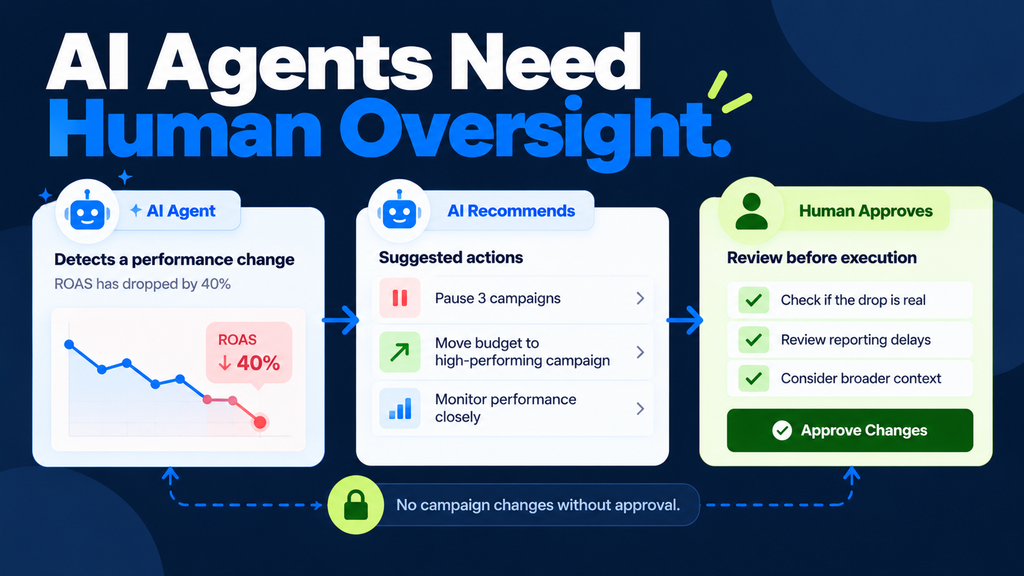
Your campaigns are performing well, and suddenly your Return on Ad Spend (ROAS) starts dropping.
An AI agent identifies the change and recommends pausing three campaigns. It also suggests moving the budget to another campaign that seems to be performing better.
Sounds interesting, right?
But what happens if the ROAS dropped because of delayed conversion reporting and not because the campaigns were actually underperforming?
If you allow the AI agent to make those changes automatically, you might end up pausing profitable campaigns.
Note: This is a hypothetical example to explain the importance of human approval. It is not a documented client result.
With AI agents becoming part of almost every performance marketing process, businesses are exploring different ways to automate their daily marketing activities.
From preparing reports to analysing campaigns and recommending optimisations, AI agents can support several performance marketing tasks.
But there is one important question.
Should you allow an AI agent to make every performance marketing decision on its own?
Not necessarily.
In this article, I will explain how AI agents in performance marketing work, which activities you can automate, which recommendations need human review and which campaign changes should require explicit approval.
You will also learn a practical framework to introduce AI agents into your marketing workflow without giving them unrestricted control over budgets, campaigns or customer information.
Let’s get started!
What Are AI Agents in Performance Marketing?
AI agents in performance marketing are AI-powered systems that can use approved tools, analyse marketing information and perform defined tasks within a set of instructions and permissions.
Unlike a normal chatbot, an AI agent can manage a series of steps towards completing a task, depending on how it has been designed.
For example, imagine you are preparing a weekly marketing performance report.
Normally, you might open Google Ads, Meta Ads and Google Analytics 4 (GA4), download the reports, compare the metrics and prepare a summary for your team.
An AI agent connected to approved reporting tools could help retrieve the information, organise the data, identify unusual changes and prepare a draft report.
However, it should not automatically assume that every performance change requires a campaign adjustment.
An agent’s usefulness depends on the tools it can access, the instructions it follows and the limits placed on its actions.
Chatbot vs Rule-Based Automation vs AI Agent
These three terms are often used interchangeably, but they are not exactly the same.
| System | Example in performance marketing | How it works |
|---|---|---|
| Chatbot | Writes five Google Ads headlines after receiving a prompt | Responds to a direct request |
| Rule-based automation | Sends an alert when daily spending crosses an approved limit | Follows predefined rules |
| AI agent | Retrieves campaign reports, investigates a performance change and prepares recommendations | Chooses steps and uses approved tools to complete a task |
For example, a rule-based system can alert you when Cost Per Acquisition (CPA) crosses ₹1,000.
An AI agent could go further by gathering the available campaign data, checking recent account changes and preparing possible explanations.
But remember, an explanation generated by AI is not automatically correct.
You still need to verify the information before taking action.
Is Google Ads Smart Bidding an AI Agent?
Google Ads already provides automated features like Smart Bidding, which uses Google’s AI to optimise bids for conversions or conversion value.
However, this is different from an external AI agent that collects reports, investigates campaign performance and recommends actions across marketing platforms.
You don’t need an external agent to replace every automated function already available inside Google Ads or Meta Ads.
Instead, use agents for specific workflows where they can provide additional value.
My suggestion: Start by using AI agents to support reporting and analysis rather than giving them complete control over campaign optimisation.
The 3-Level AI Marketing Framework: Automate, Review and Approve
Now that you understand what AI agents are, the next step is deciding what they should be allowed to do.
I recommend using a simple three-level framework.
This is a proposed starting policy for marketing teams, not a universal industry standard.
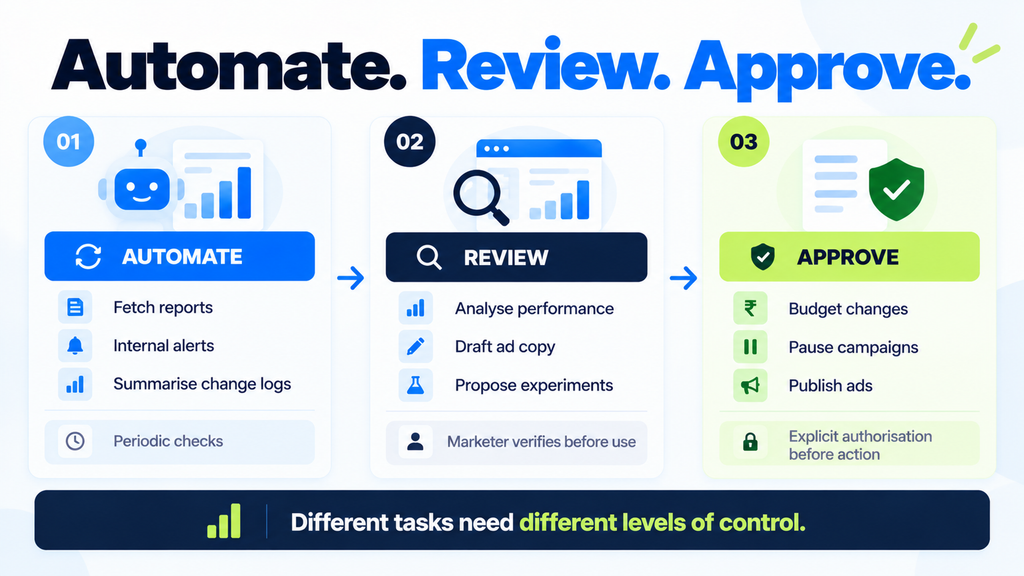
| Level | Suitable marketing tasks | Human involvement |
|---|---|---|
| Automate | Fetch reports, format approved data, prepare internal alerts and summarise change logs | Periodic checks |
| Review | Analyse performance, draft ad copy, classify search terms and propose experiments | Marketer verifies before use |
| Approve | Modify budgets, pause campaigns, change bidding settings, publish ads or access additional customer data | Explicit authorisation before action |
The difference between these three levels is important.
An AI agent that prepares a report has a different level of responsibility from an AI agent that increases your advertising budget.
The second action involves direct financial exposure.
Therefore, the permissions should also be different.
When deciding the right level, consider these four questions:
- Can the action spend money or affect business revenue?
- Can the action be reversed easily?
- Does the agent need access to sensitive business or customer information?
- What happens if the agent makes a wrong decision?
The higher the potential impact, the stronger the approval process should be.
Important: Access restrictions should be enforced through actual tool permissions and approval controls. A written instruction telling an agent not to change budgets is not sufficient protection by itself.
What Performance Marketing Tasks Should You Automate First?
You don’t need to start with complex AI workflows.
In fact, some of the most useful applications involve repetitive activities that marketers perform every day.
Here are three areas worth exploring first.
1. Marketing Report Preparation
How much time does your team spend preparing daily or weekly performance reports?
If you are managing multiple accounts, downloading and organising performance data can become repetitive.
A properly configured AI agent can help prepare reports through a structured workflow.
For example:
- Retrieve approved campaign metrics from authorised reporting tools.
- Use consistent date ranges, timezones and metric definitions.
- Calculate performance changes using reliable reporting tools or deterministic calculations.
- Highlight unusual changes for investigation.
- Prepare a summary with references to the underlying data.
Suppose your Google Ads spend increased by 15% compared with the previous reporting period.
The agent can highlight the increase in the report.
But if it concludes that the campaign is wasting money, it needs additional evidence.
You must check conversion data, reporting delays, campaign changes and business context before reaching that conclusion.
Recommended boundary: Read-only access to approved reporting data.
2. Campaign Monitoring and Internal Alerts
Another useful application of AI marketing automation is monitoring campaign performance.
For example, an agent could support alerts related to:
- Campaign spend pacing
- Sudden changes in recorded conversions
- Unusual fluctuations in CPA or ROAS
- Missing tracking information
- Failed report refreshes
- Recent changes made to advertising accounts
However, there is an important difference between identifying a change and identifying its cause.
For example:
“Conversions dropped by 20%” is an observation.
“The campaign stopped working” is a conclusion.
The agent should not treat both statements as equally certain.
A useful monitoring report should explain what changed, the comparison period and what needs further investigation.
3. Administrative and Reporting Activities
Performance marketing teams also spend time on activities that don’t directly involve campaign optimisation.
These include preparing meeting agendas, updating task lists, documenting campaign tests and organising account changes.
An AI agent may be able to help with:
- Weekly campaign review summaries
- Account change-log summaries
- Naming convention checks
- Organising experiment results
- Internal task preparation
- Drafting reporting notes
These are useful starting points because the team can verify the output without granting the agent permission to edit live campaigns.
My suggestion: Choose one repetitive reporting task, evaluate the results and gradually expand its responsibilities.
Which AI Marketing Tasks Require Human Review?
Not every marketing activity should run automatically.
Some tasks involve interpretation, brand communication and strategic decisions.
AI agents can help prepare the work, but a marketer should verify it before using the output.
1. Performance Analysis and Explanations
Imagine your CPA increased by 25% during the past week.
An AI agent might identify several possible reasons:
- Higher advertising costs
- Lower conversion rates
- Changes in traffic quality
- Delayed conversion reporting
- Recent campaign modifications
- Purchase tracking problems
But which explanation is correct?
Without enough information, the agent should not confidently select one reason.
A useful AI-generated analysis should clearly separate:
What the data shows: CPA increased during the selected period.
Possible explanations: Conversion delays, increased CPC or lower recorded conversions.
Missing information: Tracking status, conversion lag and recent account changes.
Recommended checks: Verify data freshness and campaign modifications before changing the strategy.
This approach makes the analysis more useful for the marketer.
2. Ad Copy and Creative Recommendations
AI tools can help generate headlines, descriptions and creative ideas quickly.
But what if the generated advertisement includes an offer that your business does not provide?
Or what if it makes a claim that is not supported by the product information?
Publishing incorrect advertisements can create problems for your customers and your brand.
Before approving AI-generated advertising content, review:
- Product and service claims
- Pricing and offer conditions
- Brand tone and messaging
- Advertising platform policies
- Unsupported promises
- Testimonials or claims that cannot be verified
AI can help speed up content creation, but it should not be allowed to invent product benefits or customer testimonials.
3. Search Term and Negative Keyword Recommendations
Negative keywords are useful for preventing advertisements from appearing on irrelevant searches.
An AI agent can help classify search terms and suggest potential exclusions.
However, some terms may be ambiguous.
A keyword that appears irrelevant initially could still have commercial value depending on the business.
If an agent automatically excludes useful search terms, it may reduce future opportunities.
So, allow AI to prepare a list of recommended negative keywords with explanations.
Then review and approve the exclusions before applying them.
4. Campaign Experiment Recommendations
AI agents can also help prepare testing ideas.
For example, an agent might recommend testing a new landing page or advertising message.
A useful experiment proposal should include:
- The problem being investigated
- A clear hypothesis
- Evidence supporting the recommendation
- The proposed change
- Success metrics
- Evaluation period
- Conditions that could invalidate the experiment
Remember: A recommendation that sounds convincing is not the same as a conclusion supported by a completed test.
Which Campaign Changes Should Require Explicit Human Approval?
This is one of the most important parts of using AI agents in performance marketing.
Would you allow an AI agent to increase your advertising budget from ₹20,000 to ₹50,000 per day without asking you?
Probably not.
But budget changes are not the only actions that can affect your business.
Under the proposed approval framework, the following activities should require explicit human authorisation:
- Increasing campaign spending
- Moving budgets between campaigns
- Launching, pausing or deleting campaigns
- Changing bidding targets
- Modifying conversion actions or values
- Publishing advertisements or landing-page changes
- Uploading or exposing customer information
- Expanding the agent’s permissions
- Sending client-facing reports or recommendations
The exact approval requirements should depend on the organisation’s risk policy.
What Should an AI Approval Request Include?
Instead of asking the marketer to approve a vague instruction such as “optimise the campaign,” the agent should provide specific details.
Here is a simple example.
Illustrative campaign approval request
| Field | Proposed information |
|---|---|
| Account | Ecommerce Google Ads account |
| Campaign | Brand Search Campaign |
| Current daily budget | ₹5,000 |
| Proposed daily budget | ₹6,000 |
| Reason | Campaign appears limited by budget |
| Supporting evidence | Recent performance and budget utilisation |
| Risks | Increased spend without proportional conversions |
| Maximum approved change | ₹1,000 daily budget increase |
| Proposed evaluation | Review after an agreed period |
| Approver | Authorised performance marketing manager |
The agent should also explain what information might be missing.
For example, before increasing the budget, the marketer may need to review profit margins, conversion reporting delays and the company’s spending limits.
The approval should apply only to the exact action proposed.
If the agent later wants to increase the budget further, it should request a new approval.
The system must enforce these limitations through permissions and execution controls.
A Practical AI Agent Workflow for Google Ads and Meta Ads
Let’s understand how this process could work in an advertising account.
Consider a hypothetical ecommerce business running Google Ads and Meta Ads campaigns.
One morning, the agent detects an increase in acquisition costs.
Should it immediately pause the campaigns?
No.
It should follow a structured process.
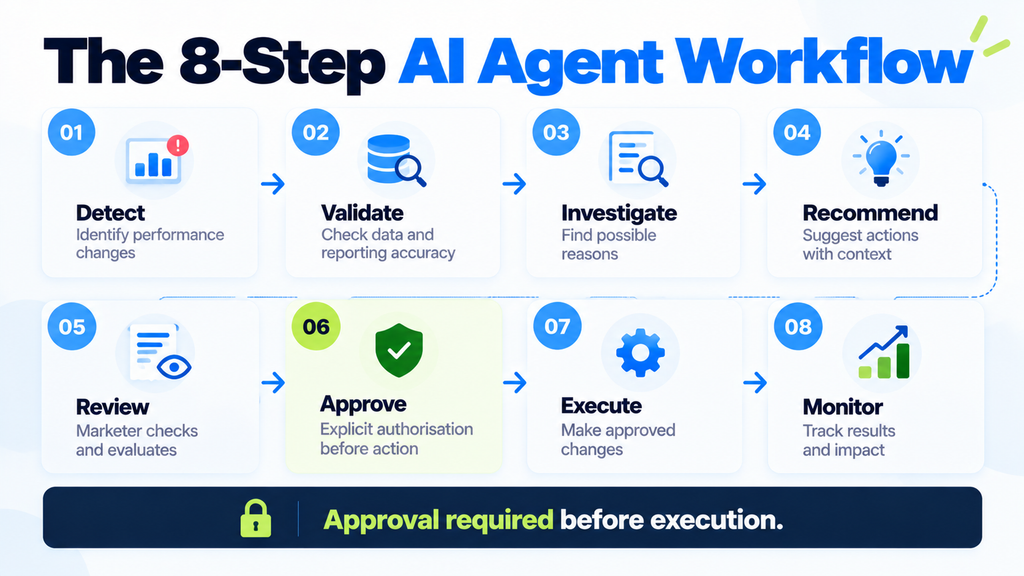
Step 1: Detect the change
The agent identifies that CPA has increased compared with the agreed reporting period.
It records the campaigns, metrics and comparison dates.
Step 2: Validate the data
Before making recommendations, the agent checks the freshness of the reporting data.
It also reviews whether there are known reporting delays or missing conversion information.
Step 3: Investigate possible causes
The agent gathers available information about recent changes, traffic patterns and campaign performance.
Instead of jumping to a conclusion, it identifies multiple explanations.
Step 4: Prepare a recommendation
Based on the available evidence, the agent prepares a recommendation.
It may suggest testing an adjustment, or it may recommend waiting until the reporting data is more complete.
Step 5: Send the recommendation for review
The responsible marketer checks the analysis.
The marketer also considers business factors that may not be available in the advertising platform, such as stock availability, product margins or upcoming promotions.
Step 6: Request approval
If the recommendation involves a campaign change, the agent requests approval for the exact proposed action.
Step 7: Execute and verify
Only after the necessary approval is recorded can the system perform the permitted change.
The workflow should then verify that the intended setting was changed correctly and save a record of the action.
Step 8: Monitor the results
Finally, the marketer evaluates whether the approved change produced the expected outcome.
If the evidence is insufficient at any stage, the workflow should stop and request more information.
Suggested workflow: Detect → Validate → Investigate → Recommend → Review → Approve → Execute → Monitor.
This is a much safer starting approach than allowing an AI agent to manage an advertising account without clearly defined limits.
Essential Guardrails Before Connecting AI Agents to Ad Accounts
Giving an agent access to an advertising account is a serious responsibility.
Before connecting any external AI system, make sure you have defined the permissions, limitations and accountability process.
1. Begin with read-only access
Allow the agent to retrieve approved information before giving it permission to make changes.
Where supported, separate the tools used for reporting from those that can edit campaigns.
Use dedicated access credentials and limit the accounts the agent can work with.
2. Set clear action limits
Define what the agent is allowed to do and what it must never do automatically.
For example, an agent may prepare a budget recommendation but should not execute it without approval.
It should also have limits on retries and repeated actions.
3. Protect customer and business information
Avoid placing passwords, API credentials or sensitive customer information inside prompts and generated reports.
Use appropriate authentication, authorisation and access controls.
Also, treat information retrieved from websites, emails or documents as data, not as instructions that can override the agent’s permissions.
4. Maintain an audit trail
Document important activities such as:
- Data retrieved and retrieval time
- Recommendations produced
- Approval decisions
- Campaign changes executed
- Errors and failed operations
- Previous settings, where practical
This information can help the team investigate unexpected changes.
5. Prepare a recovery process
If the agent makes an incorrect change, the team should be able to stop further execution immediately.
You should also document how previous settings can be restored when possible.
However, remember that reversing a campaign setting does not recover money already spent.
These safeguards should be tested before giving an AI agent access to live campaign changes.
How Do You Measure the Success of AI Agents in Performance Marketing?
Just because an AI agent completes a report in five minutes instead of thirty minutes doesn’t mean your advertising performance has improved.
Time savings are useful, but they are not the same as additional revenue or better ROAS.
When evaluating AI marketing workflows, consider the following metrics.
| Measurement area | What to evaluate |
|---|---|
| Time saved | Actual time saved after reviewing and correcting AI output |
| Accuracy | Incorrect calculations and unsupported conclusions |
| Alert quality | Useful alerts compared with false alarms |
| Recommendation quality | Recommendations accepted after verification |
| Safety | Unauthorised actions or permission violations |
| Business impact | Results of approved marketing experiments |
For example, suppose an agent saves your team five hours every month.
That can be considered an operational benefit.
But if the team spends six hours correcting inaccurate reports, the workflow has not actually saved time.
Similarly, if the agent recommends a campaign adjustment and ROAS improves afterwards, you should evaluate the test and other contributing factors before claiming the agent caused the improvement.
My suggestion: Measure operational reliability first. Evaluate business impact only when you have sufficient evidence.
How to Introduce AI Agents into Your Marketing Team
You don’t need to give AI full control from day one.
A gradual approach will help your team understand the benefits and limitations.
Phase 1: Start with a read-only pilot
Choose one simple task, such as preparing a weekly campaign report.
Compare the agent’s output with a report verified by a marketer.
Check data accuracy, calculation errors and time saved.
Phase 2: Move to recommendation mode
Once reporting is reliable, allow the agent to prepare campaign observations and recommendations.
Evaluate whether it uses the correct information and identifies uncertainty.
All recommendations should be reviewed before implementation.
Phase 3: Introduce approval-based execution
If the agent demonstrates reliable performance, consider allowing tightly limited actions.
For example, the system may execute a specifically approved campaign change.
But it should not be allowed to perform additional changes beyond the approved scope.
Phase 4: Consider limited autonomy
Only after sufficient testing should you consider allowing selected, low-risk tasks to run with limited autonomy.
Use enforced permissions, monitoring and clear stopping conditions.
Remember, not every workflow needs an AI agent.
If a simple rule-based system can solve the problem accurately and reliably, you may not need a complex agent.
The objective is to improve the marketing workflow, not to introduce AI into every activity.
Frequently Asked Questions About AI Agents in Performance Marketing
1. What are AI agents in performance marketing?
AI agents are systems that use AI models and approved tools to carry out defined marketing tasks. Depending on their permissions, they can retrieve information, prepare reports, investigate changes and assist with campaign workflows.
2. Can AI agents manage Google Ads automatically?
An AI agent can support Google Ads workflows if the connected tools and permissions allow it. However, campaign changes such as budget adjustments, pauses and bidding-target modifications should follow a clear approval policy.
3. What is the difference between AI marketing automation and an AI agent?
Traditional automation generally follows predefined rules. An AI agent can select steps and use approved tools to work towards a defined objective, within its assigned boundaries.
4. Should AI agents have access to advertising budgets?
Not by default. Start with read-only access and introduce tightly controlled editing permissions only when there is a tested business need and an appropriate approval process.
5. Will AI agents improve campaign ROAS?
AI agents may help with reporting, investigation and recommendations, but their use does not guarantee improved ROAS. Business performance needs to be evaluated through properly designed experiments and reliable measurement.
6. Which AI marketing task should beginners automate first?
Start with a low-risk activity such as organising weekly reports or preparing internal campaign summaries. It allows you to evaluate the agent without giving it permission to change live advertising settings.
Use AI to Support Better Marketing Decisions
AI agents can become useful assistants for performance marketing teams.
They can help reduce repetitive reporting activities, organise information, identify unusual changes and prepare recommendations.
However, allowing AI to analyse marketing information is not the same as allowing it to make unrestricted business decisions.
A campaign budget change, conversion-setting modification or advertisement publication can directly affect business performance.
That is why it is important to decide what should be automated, what needs review and what requires explicit approval.
Remember, the best AI workflow is not the one that makes the maximum number of changes. It is the one that saves time, provides useful information and knows when to stop for human approval.
If you are planning to introduce AI agents into your performance marketing activities, start with one simple workflow, define the permissions clearly and measure the results before expanding.
AI Agent Permissions and Approval Checklist
Before connecting an AI agent to your Google Ads or Meta Ads account, prepare a checklist covering:
- Approved accounts and data sources
- Read-only and editing permissions
- Tasks that can run automatically
- Recommendations requiring review
- Actions requiring explicit approval
- Spending and execution limits
- Evidence needed before campaign changes
- Authorised approvers
- Audit logs and recovery procedures
Use this checklist as the starting point for your agent-assisted marketing workflow.
Have you started using AI agents for your Google Ads or Meta Ads campaigns? Which marketing activities would you prefer to automate, and which ones would you always review personally?
Do share your thoughts in the comments section. It may help fellow digital marketers exploring AI-powered workflows.