
Are you planning to start your first blog or business website? Are you confused about choosing between Bluehost and Hostinger?
If yes, you have come to the right place.
When we start a website, there are several things we need to consider. We have to select a domain name, choose a hosting company, install WordPress and start creating content.
Among these, choosing the right web hosting provider is important.
Why?
Because your hosting service affects how your website performs, how easily you can manage it and how much money you spend maintaining it.
Bluehost and Hostinger are two popular web hosting providers. Both offer WordPress hosting, beginner-friendly features and multiple hosting plans.
But which one should you choose?
Should you select Hostinger because of its affordable starting price? Or should you consider Bluehost because of its WordPress hosting features?
In this article, I will compare Bluehost vs Hostinger based on pricing, renewal costs, storage, website speed, security, backups, customer support and other important factors.
By the end of this article, you will have a better understanding of which provider suits your website and budget.
Let us get started!
Bluehost vs Hostinger: Which Is Better for Beginners?
If you want a quick answer, here is my suggestion.
Hostinger is worth considering if you are starting your first website with a limited budget. Its Single plan currently has a lower advertised introductory price and includes essential features for a basic website.
Bluehost is worth considering if you prefer its WordPress-focused hosting experience and the features available in its plans. Its Starter plan supports multiple websites and provides a range of WordPress management tools.
However, the cheapest advertised monthly price does not tell you the complete story.
You also need to consider how much you pay upfront, what happens when the hosting plan renews and which features are included.
For example, Hostinger may appear considerably cheaper based on the monthly advertisement. But its lowest displayed rate requires a longer initial subscription than the Bluehost plan used in this comparison.
My suggestion is to compare the total cost and features before making a payment.
Bluehost vs Hostinger: Quick Comparison Table
Have a look at this comparison of the entry-level hosting plans available on their official Indian websites.
| Features | Bluehost Starter | Hostinger Single |
|---|---|---|
| Advertised starting price | ₹199/month | ₹69/month |
| Initial period for displayed price | 36 months | 48 months |
| Initial hosting cost before taxes | ₹7,164 | ₹3,312 |
| Advertised renewal rate | ₹349/month for a 36-month term | ₹289/month |
| Websites supported | Up to 10 | 1 |
| Storage | 10 GB NVMe SSD | 10 GB SSD |
| Free domain | First year | Included, subject to offer terms |
| Free SSL certificate | Yes | Yes |
| Backups | Weekly backups advertised | Weekly backups advertised |
| WordPress support | Yes | Yes |
| Customer support | 24/7 chat | 24/7 support |
| Money-back guarantee | 30 days, subject to conditions | 30 days, subject to conditions |
Pricing checked in October 2026 using the official Indian hosting pages. Taxes, promotions, renewal terms and feature availability may change. Storage and website limits depend on the selected plan.
Official pricing sources: Bluehost Web Hosting Pricing and Hostinger Web Hosting Pricing.
Now, let us understand these differences one by one.
1. Bluehost vs Hostinger: Company Overview
Before comparing the hosting plans, let us understand what these companies offer.
What is Bluehost?
Bluehost is a web hosting provider that offers services for individuals, bloggers, small businesses and online stores.
Its hosting products include options for WordPress websites, ecommerce businesses and websites that need additional resources.
Bluehost also provides domain registration, website management tools and services that help users create and maintain websites.
One of its major advantages is its focus on WordPress hosting.
It is also listed among the hosting providers recommended on the official WordPress.org website.
What is Hostinger?
Hostinger is another established web hosting company that offers hosting services for beginners, website owners, businesses and developers.
Its services include web hosting, WordPress hosting, cloud hosting and other website-related tools.
Hostinger is particularly attractive to beginners because it offers low introductory prices and tools that make website creation easier.
It also provides website-building tools and access to WordPress.
Interestingly, Hostinger is now listed among the recommended hosting providers on WordPress.org as well.
Remember: Both Bluehost and Hostinger are included in the current WordPress.org hosting recommendations.
So, the decision should not be based only on which company is recommended by WordPress.
You should compare the actual plans, prices and features.
2. Bluehost vs Hostinger Pricing: Which Is More Affordable?
Pricing is probably the first thing that beginners check when choosing a hosting company.
After all, nobody wants to spend more money than necessary when starting a blog.
But there is one important thing you should understand.
The monthly price shown on a hosting website is often based on paying for several months or years in advance.
This is why you should never compare hosting plans using only their advertised monthly prices.
Bluehost hosting pricing
At the time of this update, Bluehost India advertises its Starter plan at ₹199 per month when purchased for a 36-month term.
That means the initial hosting cost is:
₹199 × 36 months = ₹7,164
This amount excludes applicable taxes and any additional paid services.
Bluehost lists the renewal rate for the same 36-month term at ₹349 per month.
Therefore, the renewal price is higher than the introductory offer.
Hostinger hosting pricing
Hostinger India advertises its Single plan at ₹69 per month for a 48-month term.
The initial hosting cost is:
₹69 × 48 months = ₹3,312
Hostinger lists a renewal rate of ₹289 per month.
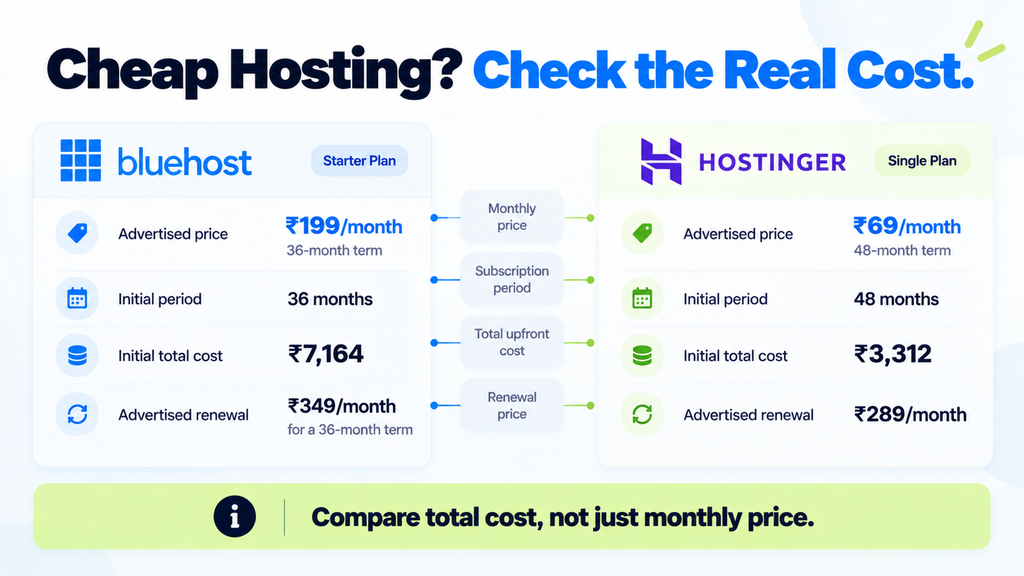
As you can see, Hostinger has a lower initial hosting cost for the advertised plans.
However, the subscription periods are different.
Bluehost uses a 36-month period in this example, while Hostinger uses 48 months.
That means these totals are useful for understanding the amount you pay, but they do not represent identical contract lengths.
Why should you check renewal prices?
Imagine you are happy to start a blog because the hosting company offers an attractive introductory discount.
After a few years, the plan renews at a higher rate.
If you have not checked the renewal conditions, the additional expense may surprise you.
My suggestion is to check the following before purchasing:
- Initial hosting cost
- Subscription duration
- Renewal price
- Domain renewal charges
- Email charges after promotional periods
- Backup and security costs
- Applicable taxes
My verdict on pricing: Hostinger has the lower advertised entry price in this comparison. However, always check the total checkout cost and renewal terms before choosing either provider.
3. Bluehost vs Hostinger: WordPress Installation and Ease of Use
If you are starting your first blog, you probably do not have much experience with website management.
You might be wondering:
Do I need coding knowledge?
Will it be difficult to install WordPress?
How will I manage my website after purchasing hosting?
The good news is that both Bluehost and Hostinger provide tools to simplify website creation.
Bluehost WordPress experience
Bluehost focuses strongly on WordPress websites.
Its hosting services include WordPress-related setup and management tools.
Depending on your plan, you can access features such as WordPress updates, website migration and other website management options.
These features can be useful for bloggers and small business owners.
Hostinger WordPress experience
Hostinger also provides WordPress hosting and tools for creating websites.
You can install and manage WordPress through its hosting interface.
Hostinger also offers website-building features for people who want to build a website without writing code.
Which one is easier?
Both providers offer beginner-friendly ways to get started.
However, I cannot declare one dashboard easier than the other without testing the current onboarding process on both services under comparable conditions.
If you are a beginner, check whether the hosting provider offers simple WordPress installation, a clear dashboard, helpful tutorials and accessible customer support.
My suggestion: Choose a hosting service that makes it easy to manage your website after installation, not just one that offers a quick setup process.
4. Bluehost vs Hostinger: Website Speed and Uptime
Website speed is another important factor.
Have you ever opened a website that took too long to load?
What did you do?
You probably closed the page and visited another website.
Your website visitors may do the same thing.
A slow website can affect the user experience, especially when people visit through mobile devices.
That is why hosting performance matters.
Website speed
Website loading speed depends on several factors.
These include your hosting resources, website theme, images, plugins, caching and server location.
Both Bluehost and Hostinger advertise features designed to support website performance.
However, advertising claims are not the same as independent performance measurements.
For a fair speed comparison, you need to test similar websites under similar conditions.
For example, you could:
- Create two WordPress websites with the same theme.
- Install the same plugins on both websites.
- Use the same content and images.
- Select comparable server locations where possible.
- Test the websites using the same performance tools.
- Repeat the tests over several days.
You can use Google PageSpeed Insights to examine website performance and identify opportunities for improvement.
Without this type of testing, saying Bluehost is faster or Hostinger is faster would not be a reliable conclusion.
Website uptime
Uptime refers to the amount of time your website remains available to visitors.
For example, if your website is unavailable for several hours, visitors may not be able to access your content or complete purchases.
Bluehost currently advertises a 99.99% uptime service level agreement for the relevant hosting plans.
Hostinger advertises a 99.9% uptime guarantee.
But remember, an advertised guarantee is different from independently measured uptime.
You should also check the conditions of each guarantee.
My verdict on speed and uptime: Both companies offer performance-related features. A reliable winner would require independent testing over time, rather than relying only on advertised percentages.
5. Bluehost vs Hostinger: Security Features
Website security is important whether you are running a personal blog or an ecommerce business.
Imagine spending several months creating content and developing your website, only to face a security problem.
That would be frustrating, right?
This is why you should check the security features included in your hosting plan.
SSL certificate
Both Bluehost and Hostinger advertise free SSL certificates.
SSL helps protect information exchanged between a website and its visitors.
You can identify websites using HTTPS in their address.
SSL is an important basic security requirement, but it does not make a website completely secure by itself.
Malware protection
Malware refers to harmful software that can affect websites or devices.
Bluehost advertises malware-related security features in its hosting plans, while Hostinger also promotes website security features.
However, the exact scanning, removal and protection services can vary by plan.
Before purchasing, check which security features are included and whether additional payments are required.
Other security practices
Even if your hosting company provides security features, you should still follow basic website security practices.
For example:
- Keep WordPress updated.
- Update themes and plugins regularly.
- Use strong passwords.
- Enable additional account security where available.
- Avoid installing plugins from unknown sources.
- Maintain reliable backups.
My suggestion: Do not select hosting based only on a free SSL certificate. Check the complete security package and the available recovery options.
6. Bluehost vs Hostinger: Website Backups
Backups are another important feature that beginners sometimes overlook.
A backup is a saved copy of your website files and information.
Suppose you accidentally delete some important content.
Or imagine a plugin update creates a problem with your website.
A reliable backup may help you restore an earlier version.
Bluehost backups
Bluehost currently advertises weekly website backups within its hosting offerings.
However, you should check the exact backup and restoration conditions of your selected plan.
Hostinger backups
Hostinger advertises free weekly backups with its Single plan.
Other plans may provide different backup schedules and features.
Before purchasing, find out whether you can restore backups yourself and how long previous copies are retained.
Which backup option is better?
Do not choose a hosting provider just because it mentions free backups.
Check these questions:
- How often are backups created?
- How many backups are stored?
- Can you restore your website easily?
- Is restoration included in the plan?
- Can you download a separate backup?
I recommend keeping an additional backup outside your hosting account for important websites.
That way, you are not completely dependent on one service provider.
7. Bluehost vs Hostinger: Free Domain and Email
When you start your first website, you need a domain name.
For example, the domain name of my website is digitalnandha.com.
A domain name makes it easier for people to find your website online.
Both hosting providers advertise domain-related benefits.
Bluehost domain offer
Bluehost provides a free domain for the first year with eligible hosting plans.
However, domain renewal charges may apply after the promotional period.
Hostinger domain offer
Hostinger also advertises a free domain with its current Single plan under the applicable offer conditions.
This is an important update because older comparisons sometimes state that Hostinger does not include a free domain with its entry-level plan.
That information is outdated for the offer reviewed here.
What about business email?
A professional email address can be useful for business websites.
For example, instead of using a personal email address, a business might use [email protected].
Both providers offer email-related services, but the included features and promotional periods may differ.
Before purchasing, check whether email hosting is permanently included, available for a limited period or requires an additional subscription later.
My verdict: Both providers offer domain-related benefits. Compare domain renewal charges and email terms rather than assuming the first-year offer covers everything.
8. Bluehost vs Hostinger: Customer Support
Imagine you have just started a website.
One day, you face a problem while installing WordPress.
Whom will you contact?
This is where customer support becomes important.
Bluehost and Hostinger both advertise around-the-clock support.
However, the available contact methods can differ.
Bluehost support
Bluehost advertises 24/7 chat support on its Starter hosting plan.
Phone support is not included in that entry-level plan.
Some higher-level Bluehost plans include phone support.
Hostinger support
Hostinger advertises 24/7 support through its available support channels.
Before purchasing, check the current communication methods and whether your selected plan includes priority assistance.
How can you evaluate support?
I recommend checking the support documentation before purchasing.
You can also review recent customer feedback to understand common experiences.
However, customer reviews should not be treated as guaranteed predictions of your own experience.
For example, one customer may receive quick assistance while another may face delays.
My suggestion: If you are a beginner, consider the quality of the knowledge base, support availability and ease of getting help when something goes wrong.
9. Bluehost vs Hostinger for Blogging and Small Businesses
Now that we have compared the important features, let us understand which hosting provider may suit your specific requirements.
If you are starting your first blog
If you are planning to create a personal blog and want to keep your initial hosting expenses low, Hostinger Single is worth considering.
The current plan includes essential website features and has a lower advertised starting price in this comparison.
If you want to understand why blogging can be useful, have a look at my article on the advantages of blogging for small businesses.
If you want to host multiple websites
Bluehost Starter currently advertises support for up to 10 websites.
Hostinger Single is designed for one website.
So, if you plan to launch multiple websites, Bluehost Starter may be worth considering.
You should also compare Hostinger plans that support multiple websites before making a decision.
A higher-level Hostinger plan may be more suitable than Single for this requirement.
If you are creating a business website
For a business website, do not choose hosting only because it is cheap.
Consider reliability, support, backups, security and future growth.
You may initially need a simple website with information about your business and contact details.
Later, you might want additional features such as online booking, payments or ecommerce.
Choose a plan that fits your present requirements while allowing you to upgrade when necessary.
If you are building an ecommerce website
An ecommerce website may need more resources than a basic personal blog.
You should consider the number of products, expected traffic, security, backup requirements and payment-related features.
Both providers offer options for ecommerce websites.
However, their entry-level plans may not be the best choice for every online store.
Check the resources and ecommerce features available in the specific plans you are comparing.
10. What Should You Check Before Buying Web Hosting?
Before you purchase hosting from Bluehost, Hostinger or another company, take a few minutes to review the following checklist.
Check the total cost
Look beyond the advertised monthly price.
Calculate the actual amount you need to pay during checkout.
Understand the renewal price
Hosting discounts are often promotional.
Make sure the renewal price fits your budget.
Select the right storage and website limit
If you need only one website, you may not need a plan that supports dozens of websites.
On the other hand, if you plan to create multiple websites, check those limits before purchasing.
Verify the backup and security features
Find out what is included and whether extra payments are required.
Check the server location
If most of your visitors are from India, choosing an appropriate server location may help with performance.
Actual speed still depends on several technical factors.
Read the refund policy
Both providers advertise money-back guarantees, but conditions and exclusions apply.
Domain charges and additional services may not always qualify for refunds.
Compare the support options
Make sure the available support methods are suitable for your technical knowledge.
Remember: The best web hosting plan is not necessarily the cheapest one. It is the plan that meets your website requirements at a cost you can manage.
Frequently Asked Questions About Bluehost vs Hostinger
1. Which is better, Bluehost or Hostinger?
Both are suitable options for different requirements.
Hostinger may be attractive to beginners who want a lower introductory price for a single website.
Bluehost may be worth considering for users who want its WordPress-focused features and a Starter plan that supports multiple websites.
The better choice depends on your budget and hosting requirements.
2. Is Hostinger cheaper than Bluehost?
In the official Indian offers checked in October 2026, Hostinger Single has a lower advertised starting price than Bluehost Starter.
However, the cheapest advertised rates apply to different subscription periods.
Always compare the total upfront payment and renewal prices.
3. Is Bluehost better for WordPress?
Bluehost offers several WordPress-related features and has a long history of being recommended by WordPress.org.
However, Hostinger is also currently listed among the WordPress.org recommended hosting providers.
Both can be considered for WordPress websites.
4. Does Hostinger provide a free domain?
Yes. Hostinger currently advertises a free domain with its Single plan under the applicable offer conditions.
Check the domain eligibility and renewal costs before purchasing.
5. Which hosting provider is faster?
I cannot reliably declare a winner without independent testing of comparable websites.
Website speed depends on hosting resources, location, theme, plugins, images and caching.
6. Can I move my WordPress website from Bluehost to Hostinger?
Website migration is generally possible, and both providers advertise migration-related assistance or tools.
Before moving your website, check the applicable migration process and create a complete backup.
7. Are Bluehost and Hostinger suitable for beginners?
Yes. Both providers offer WordPress hosting and tools designed to help users create websites.
Compare their setup experience, support options and costs before choosing.
8. Should I choose hosting based only on the starting price?
No.
You should also consider renewal charges, website limits, storage, backups, security, performance requirements and customer support.
Final Verdict: Bluehost vs Hostinger, Which Should You Choose?
After comparing the important features of Bluehost and Hostinger, here is my suggestion.
Choose Hostinger if:
- You are starting your first blog or personal website.
- You want a lower initial hosting cost.
- You need hosting for one website.
- You are comfortable with the available introductory subscription term.
- The features of the selected plan match your requirements.
Consider Bluehost if:
- You prefer its WordPress-focused hosting experience.
- You want to host multiple websites under an eligible plan.
- You find its management tools and support options suitable.
- Its total cost and renewal terms fit your budget.
For a beginner starting a single blog, I would consider Hostinger first based on the currently advertised introductory pricing.
However, I would compare the actual checkout amount and renewal terms before purchasing.
For someone planning to manage multiple WordPress websites, I would also evaluate Bluehost Starter alongside Hostinger’s higher-level hosting plans.
There is no universal winner for every website.
The best choice depends on what you want to build and how much you are prepared to spend.
Remember, choosing a good hosting provider is only the first step. The success of your blog also depends on useful content, proper SEO, website maintenance and your consistency.
So, spend some time comparing the features and choose the hosting provider that matches your requirements.
Have you used Bluehost or Hostinger for your blog? How has your experience been with website performance and customer support?
Do share your experience in the comments section. Your suggestions might help someone who is planning to start their first website.
Adbee solutions, a cutting-edge digital marketing company in coimbatore, helps you establish a presence online, particularly on search engines and social media.